
Student Work

Canvas

What if Tablets PCs (e.g., iPad) were designed specifically for Designers?

Rendering of a designer using Canvas to sketch.

Rendering of a designer using Canvas to sketch.

Canvas was my student project from years ago—before Apple’s iPad had a pencil. The project is an exercise in designing for a target use. Here are some ideas I thought was clever:
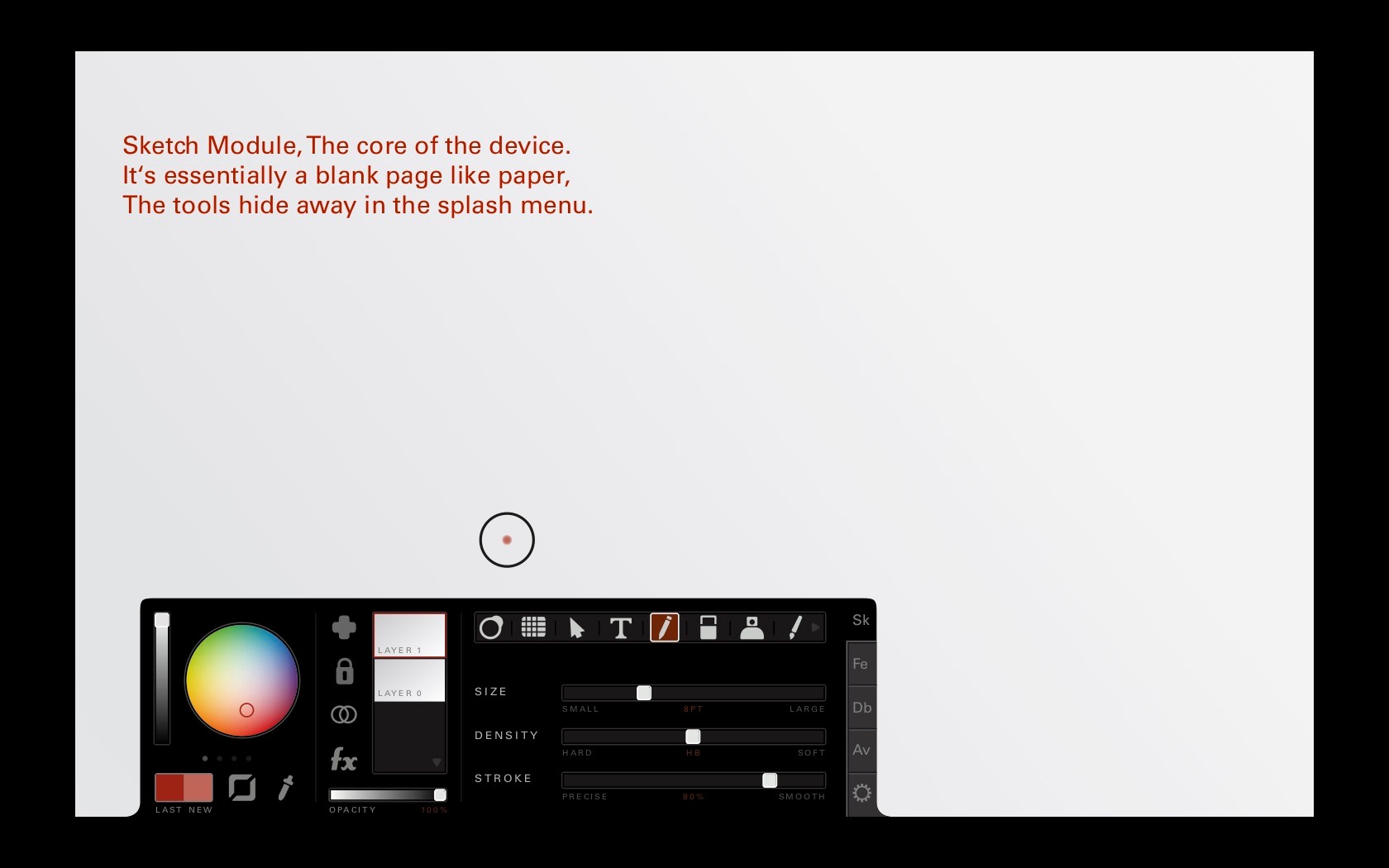
A palette design. It may seem mundane today, but this was designed when pro sketching apps on tablets didn’t exist.

A palette design. It may seem mundane today, but this was designed when pro sketching apps on tablets didn’t exist.

Remember slide-to-unlock? Users would have to draw an ellipse—common practice for sketching.

Remember the original software-lock? Instead of slide-to-unlock, users would need to draw an ellipse—a common sketching warm-up.

A common passed design heuristic: designing for everyone is to design for no one. It’s a lesson that sticks with me today. Having a specific target, means innovation and decisions flow swifter in product development.

Multi-tasking without overlapping windows, instead using the golden ratio. Apps would change in function as it takes up more or less space.

Multi-tasking without windows? This solution is based on the golden ratio—repeating porpotions Apps would change their design as they took up less space.

Beyond content creation, the ability to share and communicate is a valuable part of any designer’s workflow.
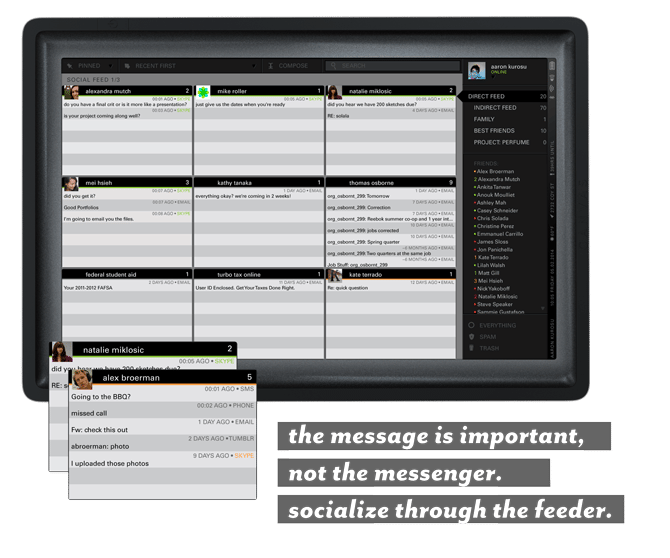
Communication aggregated from across platforms (e.g., email, social media, sms) to focus on the relationship.

Communication aggregated from across platforms (e.g., email, social media, sms). A design that focuses on relationships.
Familiarity with people and their workflow helps to design tools they’ll find useful.

About me

Professional Work

Scholar 2.0

Explore

two people sitting on a ledge talking

Unofficial Concept

Stager 3.0

Explore

Professional Work

Neural Filter

Explore

© Aaron K Roek 2026 All Rights Reserved

Student Work

Canvas

What if Tablets PCs (e.g., iPad) were designed specifically for designers?

Rendering of a designer using Canvas to sketch.

Rendering of a designer using Canvas to sketch.

Canvas was my student project from years ago—before Apple’s iPad had a pencil. The project is an exercise in designing for a target use. Here are some ideas I thought was clever:

A palette design. It may seem mundane today, but this was designed when pro sketching apps on tablets didn’t exist.

A palette design. It may seem mundane today, but this was designed when pro sketching apps on tablets didn’t exist.

Remember slide-to-unlock? Users would have to draw an ellipse—common practice for sketching.

Remember the original software-lock? Instead of slide-to-unlock, users would need to draw an ellipse—a common sketching warm-up.

A common passed design heuristic: designing for everyone is to design for no one. It’s a lesson that sticks with me today. Having a specific target, means innovation and decisions flow swifter in product development.

Multi-tasking without overlapping windows, instead using the golden ratio. Apps would change in function as it takes up more or less space.

Multi-tasking without windows? This solution is based on the golden ratio—repeating porpotions Apps would change their design as they took up less space.

Beyond content creation, the ability to share and communicate is a valuable part of any designer’s workflow.

Communication aggregated from across platforms (e.g., email, social media, sms) to focus on the relationship.

Communication aggregated from across platforms (e.g., email, social media, sms). A design that focuses on relationships.
Familiarity with people and their workflow helps to design tools they’ll find useful.

About me

Professional Work

Scholar 2.0

Explore

two people sitting on a ledge talking

Unofficial Concept

Stager 3.0

Explore

Professional Work

Neural Filter

Explore

stationery materials laying on a grid

© Aaron K Roek 2026 All Rights Reserved

Student Work

Canvas

What if Tablets PCs (e.g., iPad) were designed specifically for designers?

Rendering of a designer using Canvas to sketch.

Rendering of a designer using Canvas to sketch.

Canvas was my student project from years ago—before Apple’s iPad had a pencil. The project is an exercise in designing for a target use. Here are some ideas I thought was clever:

A palette design. It may seem mundane today, but this was designed when pro sketching apps on tablets didn’t exist.

A palette design. It may seem mundane today, but this was designed when pro sketching apps on tablets didn’t exist.

Remember slide-to-unlock? Users would have to draw an ellipse—common practice for sketching.

Remember the original software-lock? Instead of slide-to-unlock, users would need to draw an ellipse—a common sketching warm-up.

A common passed design heuristic: designing for everyone is to design for no one. It’s a lesson that sticks with me today. Having a specific target, means innovation and decisions flow swifter in product development.

Multi-tasking without overlapping windows, instead using the golden ratio. Apps would change in function as it takes up more or less space.

Multi-tasking without overlapping windows, instead using the golden ratio. Apps would change in function as it takes up more or less space.

Beyond content creation, the ability to share and communicate is a valuable part of any designer’s workflow.

Communication aggregated from across platforms (e.g., email, social media, sms) to focus on the relationship.

Communication aggregated from across platforms (e.g., email, social media, sms). A design that focuses on relationships.
Familiarity with people and their workflow helps to design tools they’ll find useful.

About me

Professional Work

Scholar 2.0

Explore

scholar 2.0

Unofficial Concept

Stager 3.0

Explore

Professional Work

Neural Filter

Explore

neural filters